

| 일 | 월 | 화 | 수 | 목 | 금 | 토 |
|---|---|---|---|---|---|---|
| 1 | 2 | 3 | ||||
| 4 | 5 | 6 | 7 | 8 | 9 | 10 |
| 11 | 12 | 13 | 14 | 15 | 16 | 17 |
| 18 | 19 | 20 | 21 | 22 | 23 | 24 |
| 25 | 26 | 27 | 28 | 29 | 30 | 31 |
- 스프링 핵심원리
- java
- Spring
- 오블완
- kubernetes
- 엘라스틱서치
- ElasticSearch
- 이차전지관련주
- 스프링부트
- 카카오
- springboot
- Kotlin
- 자바
- 이펙티브 자바
- 김영한
- JavaScript
- Effective Java
- Sort
- effectivejava
- k8s
- 티스토리챌린지
- 스프링
- 예제로 배우는 스프링 입문
- 클린아키텍처
- 자바스크립트
- 알고리즘정렬
- Effective Java 3
- 이펙티브자바
- 알고리즘
- 스프링핵심원리
- Today
- Total
Kim-Baek 개발자 이야기
OpenAPI 3.0 완벽 가이드 | Spring Boot Swagger로 API 문서 자동화하기 🚀 본문
이 글을 읽으면: API 문서 작성의 고통에서 벗어날 수 있습니다. OpenAPI(Swagger)를 사용하여 코드만 작성하면 자동으로 문서가 생성되고, 프론트엔드 개발자와의 협업도 10배 쉬워집니다. Spring Boot 실전 예제와 함께 배워보세요.
📌 목차
- 왜 API 문서 자동화가 필요한가?
- OpenAPI란? Swagger와의 차이
- Spring Boot에 적용하기 - 단계별 가이드
- Controller와 DTO 문서화
- Swagger UI 활용법
- 실무 활용 팁
- 트러블슈팅
1. 왜 API 문서 자동화가 필요한가?
😫 실무에서 겪는 API 문서의 고통
상황 1: 끝없는 Postman Collection 관리
개발자: "API 스펙이 바뀌었는데, Postman Collection도 수정해야 하나..."
프론트엔드: "어? 저는 아직 예전 Collection 쓰고 있었는데요?"
개발자: "😱 아... 다시 공유해드릴게요"
상황 2: 노션/구글 문서의 지옥
API 문서 (작성일: 2024.01.15)

POST /api/users
Request:
{
  "name": "string",
  "email": "string"
}

→ 2주 후 코드 변경
→ 문서 업데이트 깜빡
→ 프론트엔드 개발자 "왜 안 되죠?" 😡
상황 3: 프론트엔드 개발자와의 커뮤니케이션
프론트: "이 API 파라미터가 필수인가요? 선택인가요?"
백엔드: "코드 보고 말씀드릴게요... (5분 후) 필수입니다"
프론트: "Response에서 이 필드 타입이 뭐죠?"
백엔드: "잠시만요... (또 5분)"
✨ OpenAPI(Swagger)의 해결책
✅ 코드만 작성하면 문서 자동 생성
✅ 코드와 문서가 항상 동기화
✅ Swagger UI로 바로 테스트 가능
✅ 프론트엔드에게 URL 하나만 공유하면 끝
✅ TypeScript 타입 자동 생성 가능
2. OpenAPI란? Swagger와의 차이
2.1 용어 정리
많은 분들이 혼동하시는데, 정확한 관계는 이렇습니다:
┌─────────────────────────────────────────┐
│          OpenAPI Specification          │
│         (API 문서화 표준 규격)            │
│                                         │
│  - RESTful API를 설명하는 표준 포맷      │
│  - YAML 또는 JSON 형식                  │
│  - 현재 버전: 3.1.0                     │
└─────────────────────────────────────────┘
                    ↓
┌─────────────────────────────────────────┐
│              Swagger Tools              │
│         (OpenAPI를 다루는 도구들)        │
│                                         │
│  - Swagger UI: 문서를 웹으로 보여줌      │
│  - Swagger Editor: 스펙 편집 도구        │
│  - Swagger Codegen: 코드 자동 생성       │
└─────────────────────────────────────────┘
쉽게 말하면:
- OpenAPI: API 문서를 작성하는 "규칙"
- Swagger: OpenAPI 규칙을 따르는 "도구들"
2.2 역사
2010년: Swagger 프로젝트 시작
2015년: Swagger가 OpenAPI Initiative에 기부
2016년: OpenAPI Specification 2.0 → 3.0 발표
현재: OpenAPI 3.1.0 (최신)

→ 결론: Swagger는 OpenAPI의 구현체 중 하나
2.3 왜 사용해야 하나?
기존 방식 (수동 문서) OpenAPI 사용 시
| 코드 작성 → 문서 작성 (2배 작업) | 코드 작성 → 문서 자동 생성 |
| 코드 수정 → 문서 수정 깜빡 | 코드 수정 → 문서 자동 반영 |
| Postman으로 직접 테스트 | Swagger UI에서 바로 테스트 |
| 구글 문서 링크 공유 | Swagger UI URL 하나만 공유 |
| API 스펙 변경 통보 필요 | 문서 보면 알 수 있음 |
3. Spring Boot에 적용하기 - 단계별 가이드
Step 1: 의존성 추가
// build.gradle.kts
dependencies {
    // SpringDoc OpenAPI (권장)
    implementation("org.springdoc:springdoc-openapi-starter-webmvc-ui:2.3.0")

    // 또는 Springfox (구버전, 비추천)
    // implementation("io.springfox:springfox-boot-starter:3.0.0")
}
💡 SpringDoc vs Springfox
SpringDoc (✅ 추천):
- Spring Boot 3.x 지원
- OpenAPI 3.0 완벽 지원
- 활발한 업데이트
- 성능 우수

Springfox (⚠️ 비추천):
- Spring Boot 2.x까지만 지원
- 더 이상 업데이트 안 됨
- OpenAPI 2.0 기반
Step 2: 기본 설정 (application.yml)
# application.yml
springdoc:
  api-docs:
    path: /api-docs                    # OpenAPI JSON 경로
    enabled: true                       # API 문서 활성화
  swagger-ui:
    path: /swagger-ui.html             # Swagger UI 경로
    enabled: true                       # Swagger UI 활성화
    operations-sorter: method          # API를 HTTP 메서드 순으로 정렬
    tags-sorter: alpha                 # 태그를 알파벳 순으로 정렬
    disable-swagger-default-url: true  # Swagger 기본 URL 비활성화

# 선택사항: 운영 환경에서는 비활성화
---
spring:
  config:
    activate:
      on-profile: prod
springdoc:
  swagger-ui:
    enabled: false  # 운영에서는 Swagger UI 끄기
Step 3: OpenAPI 설정 클래스 작성
package com.example.config

import io.swagger.v3.oas.models.OpenAPI
import io.swagger.v3.oas.models.info.Contact
import io.swagger.v3.oas.models.info.Info
import io.swagger.v3.oas.models.info.License
import io.swagger.v3.oas.models.servers.Server
import org.springframework.context.annotation.Bean
import org.springframework.context.annotation.Configuration

@Configuration
class OpenApiConfig {

    @Bean
    fun openAPI(): OpenAPI {
        return OpenAPI()
            .info(
                Info()
                    .title("사용자 관리 API")
                    .description("사용자 CRUD 및 인증 API 문서")
                    .version("v1.0.0")
                    .contact(
                        Contact()
                            .name("개발팀")
                            .email("dev@example.com")
                            .url("https://example.com")
                    )
                    .license(
                        License()
                            .name("Apache 2.0")
                            .url("https://www.apache.org/licenses/LICENSE-2.0.html")
                    )
            )
            .servers(
                listOf(
                    Server()
                        .url("http://localhost:8080")
                        .description("로컬 개발 서버"),
                    Server()
                        .url("https://api.example.com")
                        .description("운영 서버")
                )
            )
    }
}
실행 후 접속:
Swagger UI: http://localhost:8080/swagger-ui.html
OpenAPI JSON: http://localhost:8080/api-docs
4. Controller와 DTO 문서화
4.1 Controller 어노테이션
package com.example.controller

import com.example.dto.UserCreateRequest
import com.example.dto.UserResponse
import com.example.dto.UserUpdateRequest
import io.swagger.v3.oas.annotations.Operation
import io.swagger.v3.oas.annotations.Parameter
import io.swagger.v3.oas.annotations.media.Content
import io.swagger.v3.oas.annotations.media.Schema
import io.swagger.v3.oas.annotations.responses.ApiResponse
import io.swagger.v3.oas.annotations.responses.ApiResponses
import io.swagger.v3.oas.annotations.tags.Tag
import org.springframework.http.HttpStatus
import org.springframework.web.bind.annotation.*
import javax.validation.Valid

@RestController
@RequestMapping("/api/users")
@Tag(name = "User", description = "사용자 관리 API")
class UserController(
    private val userService: UserService
) {

    @GetMapping
    @Operation(
        summary = "사용자 목록 조회",
        description = "등록된 모든 사용자 목록을 조회합니다. 페이징 및 정렬을 지원합니다."
    )
    @ApiResponses(
        value = [
            ApiResponse(
                responseCode = "200",
                description = "조회 성공",
                content = [Content(
                    mediaType = "application/json",
                    schema = Schema(implementation = UserResponse::class)
                )]
            )
        ]
    )
    fun getAllUsers(
        @Parameter(description = "페이지 번호 (0부터 시작)", example = "0")
        @RequestParam(defaultValue = "0") page: Int,

        @Parameter(description = "페이지 크기", example = "20")
        @RequestParam(defaultValue = "20") size: Int
    ): List<UserResponse> {
        return userService.getAllUsers(page, size)
    }

    @GetMapping("/{id}")
    @Operation(
        summary = "사용자 상세 조회",
        description = "ID로 특정 사용자의 상세 정보를 조회합니다."
    )
    @ApiResponses(
        value = [
            ApiResponse(
                responseCode = "200",
                description = "조회 성공"
            ),
            ApiResponse(
                responseCode = "404",
                description = "사용자를 찾을 수 없음"
            )
        ]
    )
    fun getUser(
        @Parameter(description = "사용자 ID", required = true, example = "1")
        @PathVariable id: Long
    ): UserResponse {
        return userService.getUser(id)
    }

    @PostMapping
    @ResponseStatus(HttpStatus.CREATED)
    @Operation(
        summary = "사용자 생성",
        description = "새로운 사용자를 등록합니다. 이메일은 중복될 수 없습니다."
    )
    @ApiResponses(
        value = [
            ApiResponse(
                responseCode = "201",
                description = "생성 성공"
            ),
            ApiResponse(
                responseCode = "400",
                description = "잘못된 요청 (유효성 검증 실패)"
            ),
            ApiResponse(
                responseCode = "409",
                description = "이미 존재하는 이메일"
            )
        ]
    )
    fun createUser(
        @RequestBody @Valid request: UserCreateRequest
    ): UserResponse {
        return userService.createUser(request)
    }

    @PutMapping("/{id}")
    @Operation(
        summary = "사용자 정보 수정",
        description = "기존 사용자의 정보를 수정합니다."
    )
    fun updateUser(
        @Parameter(description = "사용자 ID", required = true)
        @PathVariable id: Long,

        @RequestBody @Valid request: UserUpdateRequest
    ): UserResponse {
        return userService.updateUser(id, request)
    }

    @DeleteMapping("/{id}")
    @ResponseStatus(HttpStatus.NO_CONTENT)
    @Operation(
        summary = "사용자 삭제",
        description = "사용자를 삭제합니다. 삭제된 데이터는 복구할 수 없습니다."
    )
    @ApiResponses(
        value = [
            ApiResponse(
                responseCode = "204",
                description = "삭제 성공"
            ),
            ApiResponse(
                responseCode = "404",
                description = "사용자를 찾을 수 없음"
            )
        ]
    )
    fun deleteUser(
        @Parameter(description = "사용자 ID", required = true)
        @PathVariable id: Long
    ) {
        userService.deleteUser(id)
    }
}
📊 주요 어노테이션 정리
어노테이션 사용 위치 설명
| @Tag | Controller 클래스 | API 그룹 이름 및 설명 |
| @Operation | 메서드 | API 엔드포인트 요약 및 설명 |
| @ApiResponses | 메서드 | 가능한 HTTP 응답 코드 및 설명 |
| @Parameter | 파라미터 | 파라미터 설명 및 예제 |
| @Schema | DTO 필드 | 필드 설명, 예제, 제약사항 |
4.2 DTO 문서화
package com.example.dto

import io.swagger.v3.oas.annotations.media.Schema
import javax.validation.constraints.*

@Schema(description = "사용자 생성 요청")
data class UserCreateRequest(

    @field:Schema(
        description = "사용자 이름",
        example = "김철수",
        required = true,
        minLength = 2,
        maxLength = 50
    )
    @field:NotBlank(message = "이름은 필수입니다")
    @field:Size(min = 2, max = 50, message = "이름은 2-50자 사이여야 합니다")
    val name: String,

    @field:Schema(
        description = "이메일 주소",
        example = "user@example.com",
        required = true,
        format = "email"
    )
    @field:NotBlank(message = "이메일은 필수입니다")
    @field:Email(message = "올바른 이메일 형식이 아닙니다")
    val email: String,

    @field:Schema(
        description = "나이",
        example = "30",
        minimum = "0",
        maximum = "150"
    )
    @field:Min(value = 0, message = "나이는 0 이상이어야 합니다")
    @field:Max(value = 150, message = "나이는 150 이하여야 합니다")
    val age: Int?,

    @field:Schema(
        description = "전화번호",
        example = "010-1234-5678",
        pattern = "^\\d{3}-\\d{4}-\\d{4}$"
    )
    @field:Pattern(
        regexp = "^\\d{3}-\\d{4}-\\d{4}$",
        message = "전화번호 형식이 올바르지 않습니다"
    )
    val phone: String?
)

@Schema(description = "사용자 수정 요청")
data class UserUpdateRequest(

    @field:Schema(description = "사용자 이름 (선택)", example = "김영철")
    @field:Size(min = 2, max = 50)
    val name: String?,

    @field:Schema(description = "나이 (선택)", example = "31")
    @field:Min(0)
    @field:Max(150)
    val age: Int?,

    @field:Schema(description = "전화번호 (선택)", example = "010-9876-5432")
    @field:Pattern(regexp = "^\\d{3}-\\d{4}-\\d{4}$")
    val phone: String?
)

@Schema(description = "사용자 응답")
data class UserResponse(

    @field:Schema(description = "사용자 ID", example = "1")
    val id: Long,

    @field:Schema(description = "사용자 이름", example = "김철수")
    val name: String,

    @field:Schema(description = "이메일 주소", example = "user@example.com")
    val email: String,

    @field:Schema(description = "나이", example = "30")
    val age: Int?,

    @field:Schema(description = "전화번호", example = "010-1234-5678")
    val phone: String?,

    @field:Schema(description = "생성일시", example = "2025-12-01T10:30:00")
    val createdAt: String,

    @field:Schema(description = "수정일시", example = "2025-12-01T14:20:00")
    val updatedAt: String
)
5. Swagger UI 활용법
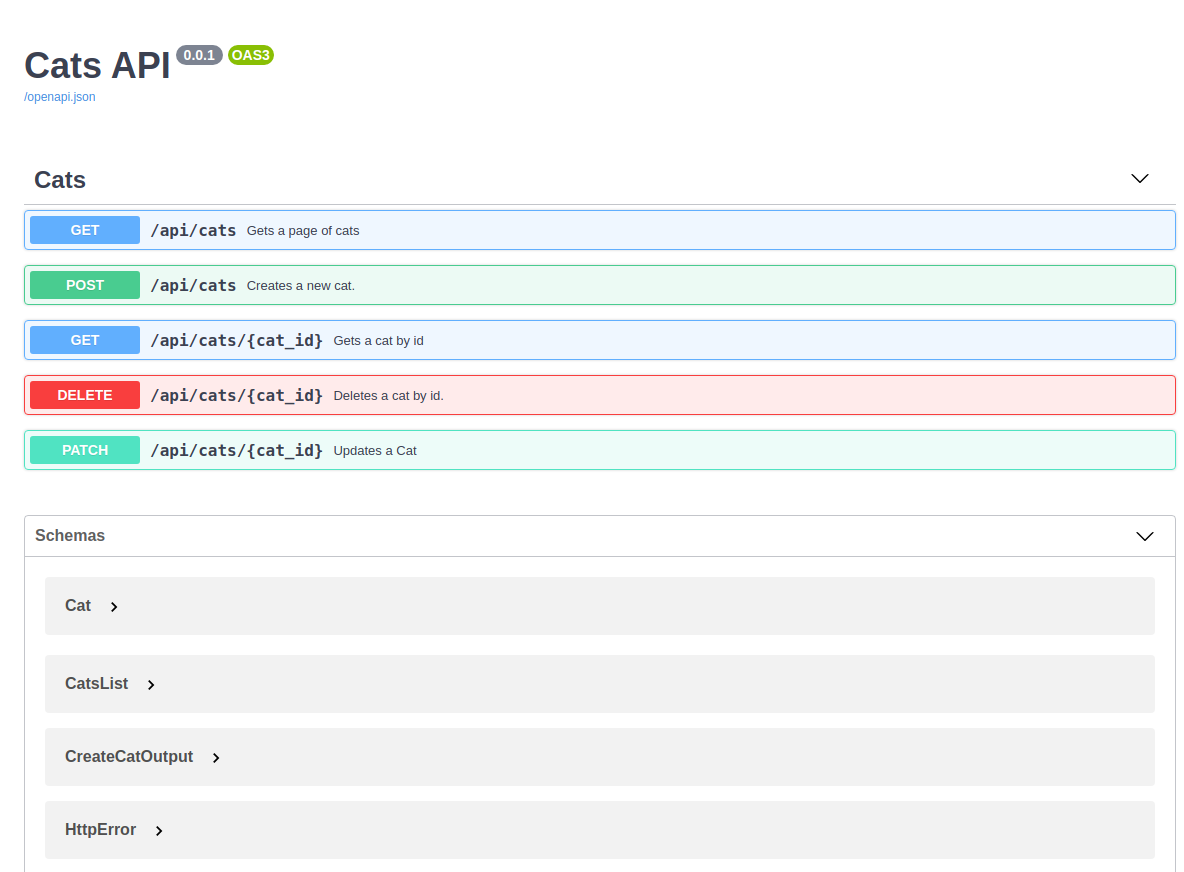
5.1 Swagger UI 화면 구조
애플리케이션을 실행하고 http://localhost:8080/swagger-ui.html에 접속하면:
┌─────────────────────────────────────────────────────────┐
│  사용자 관리 API                           v1.0.0        │
│  사용자 CRUD 및 인증 API 문서                            │
├─────────────────────────────────────────────────────────┤
│  Servers                                                │
│  ▼ http://localhost:8080  ⚙️                           │
├─────────────────────────────────────────────────────────┤
│  ▼ User - 사용자 관리 API                                │
│    GET    /api/users          사용자 목록 조회           │
│    POST   /api/users          사용자 생성               │
│    GET    /api/users/{id}     사용자 상세 조회           │
│    PUT    /api/users/{id}     사용자 정보 수정           │
│    DELETE /api/users/{id}     사용자 삭제               │
└─────────────────────────────────────────────────────────┘
5.2 API 테스트하기
1. GET /api/users (목록 조회)
1. "GET /api/users" 클릭
2. "Try it out" 버튼 클릭
3. Parameters 섹션에서 값 입력:
   - page: 0
   - size: 10
4. "Execute" 버튼 클릭

응답 확인:
HTTP 200 OK
Response body:
[
  {
    "id": 1,
    "name": "김철수",
    "email": "kim@example.com",
    "age": 30,
    "phone": "010-1234-5678",
    "createdAt": "2025-12-01T10:30:00",
    "updatedAt": "2025-12-01T10:30:00"
  }
]
2. POST /api/users (생성)
1. "POST /api/users" 클릭
2. "Try it out" 버튼 클릭
3. Request body에 JSON 입력:
   {
     "name": "이영희",
     "email": "lee@example.com",
     "age": 25,
     "phone": "010-9876-5432"
   }
4. "Execute" 버튼 클릭

응답 확인:
HTTP 201 Created
Response body:
{
  "id": 2,
  "name": "이영희",
  "email": "lee@example.com",
  "age": 25,
  "phone": "010-9876-5432",
  "createdAt": "2025-12-01T15:20:00",
  "updatedAt": "2025-12-01T15:20:00"
}
5.3 curl 명령어 자동 생성
Swagger UI는 자동으로 curl 명령어를 생성해줍니다:
# Swagger UI에서 "Execute" 후 표시되는 curl 명령어:

curl -X 'POST' \
  'http://localhost:8080/api/users' \
  -H 'accept: application/json' \
  -H 'Content-Type: application/json' \
  -d '{
  "name": "이영희",
  "email": "lee@example.com",
  "age": 25,
  "phone": "010-9876-5432"
}'
활용법:
- 터미널에 복사해서 바로 실행 가능
- Postman 없이도 API 테스트 가능
- CI/CD 스크립트에 활용 가능
6. 실무 활용 팁
💡 Tip 1: 보안 설정 (JWT 인증)
@Configuration
class OpenApiConfig {

    @Bean
    fun openAPI(): OpenAPI {
        // JWT 인증 스키마 정의
        val jwtScheme = SecurityScheme()
            .type(SecurityScheme.Type.HTTP)
            .scheme("bearer")
            .bearerFormat("JWT")
            .`in`(SecurityScheme.In.HEADER)
            .name("Authorization")

        val securityRequirement = SecurityRequirement()
            .addList("bearerAuth")

        return OpenAPI()
            .info(Info().title("사용자 관리 API").version("v1.0.0"))
            .components(
                Components()
                    .addSecuritySchemes("bearerAuth", jwtScheme)
            )
            .security(listOf(securityRequirement))
    }
}
결과: Swagger UI에 "Authorize" 버튼이 생기고, JWT 토큰을 입력하면 모든 API 요청에 자동으로 포함됩니다.
💡 Tip 2: 환경별 설정 (운영에서는 비활성화)
# application-dev.yml (개발 환경)
springdoc:
  swagger-ui:
    enabled: true

# application-prod.yml (운영 환경)
springdoc:
  swagger-ui:
    enabled: false  # 운영에서는 Swagger UI 비활성화
또는 Spring Security로 제한:
@Configuration
@EnableWebSecurity
class SecurityConfig {

    @Bean
    fun filterChain(http: HttpSecurity): SecurityFilterChain {
        http
            .authorizeHttpRequests {
                it
                    // Swagger UI는 관리자만 접근 가능
                    .requestMatchers("/swagger-ui/**", "/api-docs/**")
                    .hasRole("ADMIN")

                    .anyRequest().authenticated()
            }

        return http.build()
    }
}
💡 Tip 3: 프론트엔드 개발자와 협업
방법 1: Swagger UI URL 공유
"API 문서 여기 있어요!"
👉 http://dev-api.example.com/swagger-ui.html

프론트엔드 개발자가 할 수 있는 것:
✅ API 스펙 확인
✅ Try it out으로 직접 테스트
✅ Request/Response 예제 확인
✅ 에러 코드 확인
방법 2: OpenAPI JSON 파일 공유
# OpenAPI Spec 다운로드
curl http://localhost:8080/api-docs -o openapi.json

# 프론트엔드에게 파일 전달
# → TypeScript 타입 자동 생성 가능
방법 3: TypeScript 타입 자동 생성
# openapi-generator 설치
npm install @openapitools/openapi-generator-cli -g

# TypeScript 타입 생성
openapi-generator-cli generate \
  -i http://localhost:8080/api-docs \
  -g typescript-axios \
  -o ./src/api

# 생성된 파일 사용
import { UserApi, UserCreateRequest } from './api'

const userApi = new UserApi()
const request: UserCreateRequest = {
  name: "김철수",
  email: "kim@example.com"
}
userApi.createUser(request)
💡 Tip 4: API 그룹화 (여러 Controller)
// 사용자 관리 API
@RestController
@RequestMapping("/api/users")
@Tag(name = "1. User", description = "사용자 관리 API")
class UserController { ... }

// 상품 관리 API
@RestController
@RequestMapping("/api/products")
@Tag(name = "2. Product", description = "상품 관리 API")
class ProductController { ... }

// 주문 관리 API
@RestController
@RequestMapping("/api/orders")
@Tag(name = "3. Order", description = "주문 관리 API")
class OrderController { ... }
결과: Swagger UI에서 번호 순서대로 정렬되어 보기 좋게 표시됩니다.
💡 Tip 5: 공통 응답 처리
// 공통 에러 응답
@Schema(description = "에러 응답")
data class ErrorResponse(

    @field:Schema(description = "에러 코드", example = "USER_NOT_FOUND")
    val code: String,

    @field:Schema(description = "에러 메시지", example = "사용자를 찾을 수 없습니다")
    val message: String,

    @field:Schema(description = "타임스탬프", example = "2025-12-01T15:30:00")
    val timestamp: String
)

// Controller에서 사용
@GetMapping("/{id}")
@ApiResponses(
    value = [
        ApiResponse(responseCode = "200", description = "조회 성공"),
        ApiResponse(
            responseCode = "404",
            description = "사용자를 찾을 수 없음",
            content = [Content(
                mediaType = "application/json",
                schema = Schema(implementation = ErrorResponse::class)
            )]
        )
    ]
)
fun getUser(@PathVariable id: Long): UserResponse {
    // ...
}
7. 트러블슈팅
❌ 문제 1: Swagger UI 접속 안 됨 (404)
증상:
http://localhost:8080/swagger-ui.html 접속 시
404 Not Found
원인 1: 의존성 누락
// ❌ 잘못된 의존성
implementation("io.springfox:springfox-boot-starter:3.0.0")

// ✅ 올바른 의존성
implementation("org.springdoc:springdoc-openapi-starter-webmvc-ui:2.3.0")
원인 2: Spring Boot 버전 불일치
Spring Boot 3.x → springdoc 2.x 사용
Spring Boot 2.x → springdoc 1.x 사용
해결:
// Spring Boot 3.x
implementation("org.springdoc:springdoc-openapi-starter-webmvc-ui:2.3.0")

// Spring Boot 2.x
implementation("org.springdoc:springdoc-openapi-ui:1.7.0")
❌ 문제 2: API가 Swagger UI에 안 나타남
증상:
Swagger UI는 열리는데
API 목록이 비어있음
원인 1: @RestController 누락
// ❌ 잘못됨
@Controller  // @RestController가 아님!
class UserController { ... }

// ✅ 올바름
@RestController
class UserController { ... }
원인 2: Component Scan 범위 밖
// Application.kt
@SpringBootApplication
@ComponentScan(basePackages = ["com.example"])  // 범위 확인!
class Application

// Controller 패키지
package com.example.controller  // ✅ 범위 안
package com.other.controller    // ❌ 범위 밖
❌ 문제 3: Spring Security에 막힘
증상:
Swagger UI 접속 시 로그인 페이지로 리다이렉트
해결:
@Configuration
@EnableWebSecurity
class SecurityConfig {

    @Bean
    fun filterChain(http: HttpSecurity): SecurityFilterChain {
        http
            .authorizeHttpRequests {
                it
                    // Swagger 관련 경로 허용
                    .requestMatchers(
                        "/swagger-ui/**",
                        "/api-docs/**",
                        "/swagger-resources/**",
                        "/v3/api-docs/**"
                    ).permitAll()

                    .anyRequest().authenticated()
            }

        return http.build()
    }
}
❌ 문제 4: @Schema 어노테이션이 적용 안 됨
증상:
@field:Schema(description = "사용자 이름", example = "김철수")
val name: String

// Swagger UI에 설명이 안 나타남
원인: @field: 접두사 누락
// ❌ 잘못됨 (Kotlin data class에서)
@Schema(description = "사용자 이름")
val name: String

// ✅ 올바름
@field:Schema(description = "사용자 이름")
val name: String
❌ 문제 5: 운영 환경에서 Swagger 노출
보안 위험:
운영 서버에서 Swagger UI가 공개되면:
❌ API 스펙 노출
❌ 내부 구조 노출
❌ 보안 취약점 발생 가능
해결 1: Profile별 설정
# application-prod.yml
springdoc:
  swagger-ui:
    enabled: false
  api-docs:
    enabled: false
해결 2: IP 제한
@Configuration
class SecurityConfig {

    @Bean
    fun filterChain(http: HttpSecurity): SecurityFilterChain {
        http
            .authorizeHttpRequests {
                it
                    .requestMatchers("/swagger-ui/**")
                    .access(IpAddressAuthorizationManager("192.168.1.0/24"))

                    .anyRequest().authenticated()
            }

        return http.build()
    }
}
8. 정리 및 다음 단계
📝 핵심 요약
// 1. 의존성 추가
implementation("org.springdoc:springdoc-openapi-starter-webmvc-ui:2.3.0")

// 2. Controller에 어노테이션
@RestController
@Tag(name = "User")
class UserController {
    @GetMapping
    @Operation(summary = "사용자 목록 조회")
    fun getUsers() { ... }
}

// 3. DTO에 어노테이션
data class UserRequest(
    @field:Schema(description = "이름", example = "김철수")
    val name: String
)

// 4. Swagger UI 접속
// http://localhost:8080/swagger-ui.html
✅ 체크리스트
OpenAPI 제대로 설정했는지 확인:
[ ] springdoc 의존성 추가
[ ] Swagger UI 접속 가능 (http://localhost:8080/swagger-ui.html)
[ ] Controller에 @Tag, @Operation 추가
[ ] DTO에 @Schema 추가
[ ] Try it out으로 API 테스트 성공
[ ] 운영 환경에서 Swagger 비활성화
🔗 참고 자료
- SpringDoc 공식 문서: https://springdoc.org
- OpenAPI Specification: https://swagger.io/specification/
- Swagger UI 데모: https://petstore.swagger.io
❓ 자주 묻는 질문
Q1. Springfox vs SpringDoc 어느 것을 써야 하나요?
SpringDoc을 사용하세요. Springfox는 더 이상 업데이트되지 않으며 Spring Boot 3.x를 지원하지 않습니다.
Q2. Swagger UI를 커스터마이징할 수 있나요?
네! application.yml에서 색상, 레이아웃, 정렬 방식 등을 변경할 수 있습니다.
Q3. API 버전 관리는 어떻게 하나요?
URL에 버전을 포함하거나 (/api/v1/users, /api/v2/users), @Tag로 버전별로 그룹화할 수 있습니다.
Q4. Postman을 완전히 대체할 수 있나요?
기본적인 테스트는 가능하지만, 복잡한 시나리오 테스트나 자동화는 Postman이 더 강력합니다. 함께 사용하는 것을 권장합니다.
Q5. 프론트엔드에서 OpenAPI Spec을 어떻게 활용하나요?
openapi-generator를 사용하여 TypeScript 타입이나 Axios 클라이언트 코드를 자동 생성할 수 있습니다.
궁금한 점이 있으시면 댓글로 남겨주세요! 💬