
| 일 | 월 | 화 | 수 | 목 | 금 | 토 |
|---|---|---|---|---|---|---|
| 1 | 2 | 3 | ||||
| 4 | 5 | 6 | 7 | 8 | 9 | 10 |
| 11 | 12 | 13 | 14 | 15 | 16 | 17 |
| 18 | 19 | 20 | 21 | 22 | 23 | 24 |
| 25 | 26 | 27 | 28 | 29 | 30 | 31 |
- 티스토리챌린지
- Sort
- springboot
- Effective Java
- kubernetes
- 예제로 배우는 스프링 입문
- java
- 스프링
- 자바
- 이펙티브자바
- JavaScript
- 엘라스틱서치
- 클린아키텍처
- 자바스크립트
- 오블완
- 알고리즘정렬
- Spring
- 알고리즘
- Kotlin
- ElasticSearch
- 데이터베이스
- 김영한
- Effective Java 3
- 카카오
- 스프링 핵심원리
- effectivejava
- 이펙티브 자바
- 스프링핵심원리
- k8s
- 스프링부트
- Today
- Total
Kim-Baek 개발자 이야기
Kotlin과 Spring Boot 완벽 통합 가이드 | Annotations, DI, 실전 패턴 본문
Java 대신 Kotlin으로 Spring Boot 개발하기 - 더 간결하고 안전한 백엔드 개발
목차
- 왜 Kotlin + Spring Boot인가?
- 프로젝트 설정과 의존성
- Spring Annotations와 Kotlin
- Dependency Injection의 Kotlin 방식
- Controller 계층 구현
- Service 계층과 트랜잭션
- Entity와 Repository
- Configuration과 Bean 정의
- 실전 예제: RESTful API 구축
들어가며
Spring Boot 프로젝트를 Java에서 Kotlin으로 마이그레이션하면서 가장 놀라웠던 점은 코드량이 30% 이상 줄어들었다는 것입니다. Boilerplate 코드가 사라지고, Null Safety로 NPE가 거의 발생하지 않았으며, Data Class 덕분에 DTO 작성이 정말 간편해졌습니다.
하지만 처음에는 Java와 다른 방식 때문에 혼란스러웠습니다.
- "생성자 주입을 어떻게 하지?"
- "왜 @Autowired를 안 쓰지?"
- "Data Class를 Entity로 쓸 수 있나?"
이런 의문들을 하나씩 해결하면서 Kotlin + Spring Boot의 베스트 프랙티스를 정리했습니다. 실제 프로덕션 코드에서 사용하는 패턴들을 예제와 함께 공유합니다.
1. 왜 Kotlin + Spring Boot인가?
1.1 Kotlin의 장점
간결성
// Java
public class UserService {
    private final UserRepository userRepository;

    @Autowired
    public UserService(UserRepository userRepository) {
        this.userRepository = userRepository;
    }
}

// Kotlin - 5줄이 1줄로!
class UserService(
    private val userRepository: UserRepository
)
Null Safety
// 컴파일 타임에 NPE 방지
val user: User? = userRepository.findById(id)
val name = user?.name ?: "Unknown"  // Safe call + Elvis operator
Data Class
// equals, hashCode, toString, copy 자동 생성
data class UserDto(
    val id: Long,
    val name: String,
    val email: String
)
1.2 Spring의 공식 지원
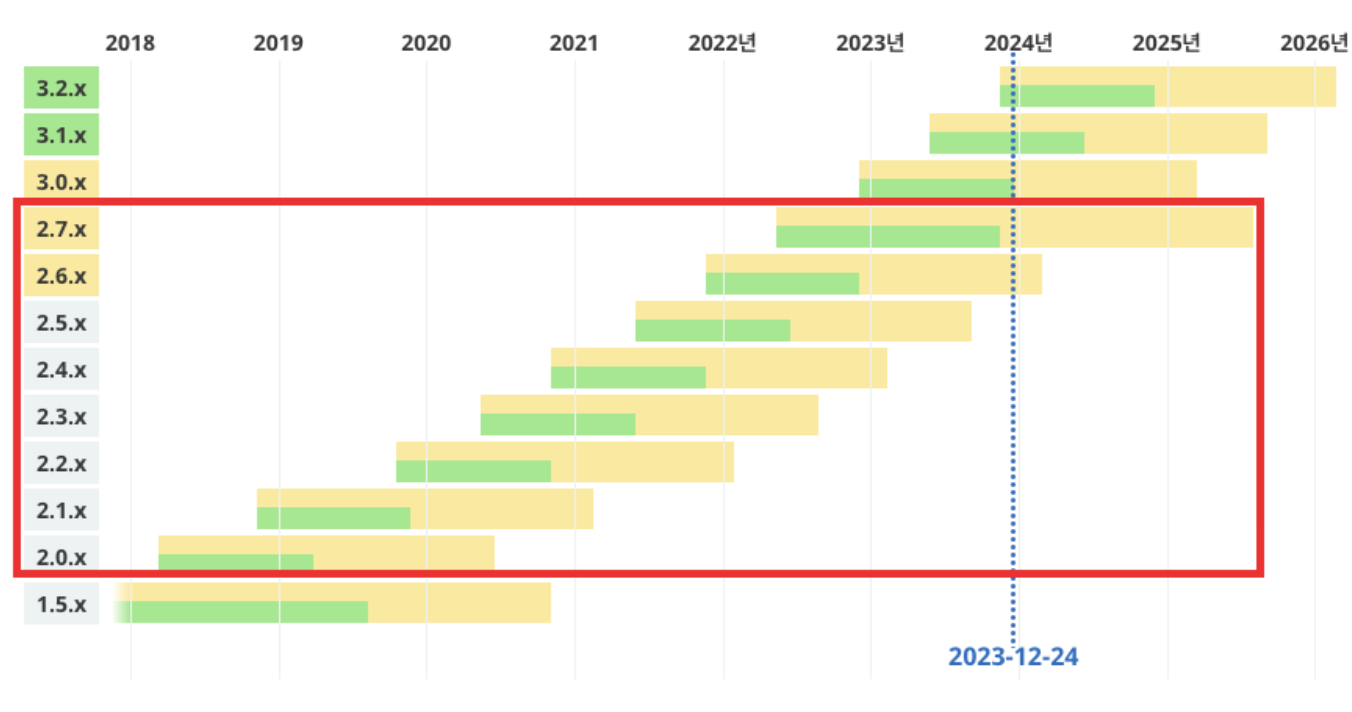
Spring Framework 5.0부터 Kotlin을 공식 지원합니다:
- Kotlin 전용 Extension Functions
- Coroutine 지원 (Spring WebFlux)
- Kotlin DSL (Router Functions, Bean Definition)
- 최적화된 Reflection 처리
1.3 성능과 호환성
- 100% Java 호환: Java 라이브러리 그대로 사용
- 동일한 성능: JVM 바이트코드로 컴파일
- 점진적 마이그레이션: Java와 Kotlin 혼용 가능
2. 프로젝트 설정과 의존성
2.1 Gradle 설정 (Kotlin DSL)
build.gradle.kts
import org.jetbrains.kotlin.gradle.tasks.KotlinCompile

plugins {
    id("org.springframework.boot") version "3.2.0"
    id("io.spring.dependency-management") version "1.1.4"
    kotlin("jvm") version "1.9.21"
    kotlin("plugin.spring") version "1.9.21"  // All-open
    kotlin("plugin.jpa") version "1.9.21"     // No-arg
}

group = "com.example"
version = "0.0.1-SNAPSHOT"
java.sourceCompatibility = JavaVersion.VERSION_17

repositories {
    mavenCentral()
}

dependencies {
    // Spring Boot
    implementation("org.springframework.boot:spring-boot-starter-web")
    implementation("org.springframework.boot:spring-boot-starter-data-jpa")

    // Kotlin
    implementation("org.jetbrains.kotlin:kotlin-reflect")
    implementation("org.jetbrains.kotlin:kotlin-stdlib-jdk8")
    implementation("com.fasterxml.jackson.module:jackson-module-kotlin")

    // Database
    runtimeOnly("com.h2database:h2")

    // Test
    testImplementation("org.springframework.boot:spring-boot-starter-test")
}

tasks.withType<KotlinCompile> {
    kotlinOptions {
        freeCompilerArgs = listOf("-Xjsr305=strict")
        jvmTarget = "17"
    }
}

tasks.withType<Test> {
    useJUnitPlatform()
}
2.2 필수 플러그인 설명
kotlin("plugin.spring") - All-open Plugin
// Spring의 프록시를 위해 클래스를 open으로 만듦
@Service
@Transactional
class UserService  // 자동으로 open class가 됨
kotlin("plugin.jpa") - No-arg Plugin
// JPA Entity에 필요한 기본 생성자 자동 생성
@Entity
data class User(
    @Id val id: Long,
    val name: String
)  // 기본 생성자가 자동으로 생성됨
2.3 application.yml 설정
spring:
  application:
    name: kotlin-spring-app

  datasource:
    url: jdbc:h2:mem:testdb
    driver-class-name: org.h2.Driver
    username: sa
    password:

  jpa:
    hibernate:
      ddl-auto: create-drop
    show-sql: true
    properties:
      hibernate:
        format_sql: true

  jackson:
    default-property-inclusion: non_null
    serialization:
      write-dates-as-timestamps: false

logging:
  level:
    root: INFO
    com.example: DEBUG
3. Spring Annotations와 Kotlin
3.1 Component Annotations
@RestController
@RestController
@RequestMapping("/api/users")
class UserController(
    private val userService: UserService
) {
    @GetMapping
    fun getAllUsers(): List<UserDto> {
        return userService.getAllUsers()
    }
}
@Service
@Service
class UserService(
    private val userRepository: UserRepository,
    private val emailService: EmailService
) {
    fun createUser(dto: UserCreateDto): User {
        // 비즈니스 로직
    }
}
@Repository
@Repository
interface UserRepository : JpaRepository<User, Long> {
    fun findByEmail(email: String): User?
    fun existsByEmail(email: String): Boolean
}
3.2 Mapping Annotations
@RestController
@RequestMapping("/api/v1/users")
class UserController(
    private val userService: UserService
) {
    // GET /api/v1/users
    @GetMapping
    fun getUsers(): List<UserDto> = userService.getAllUsers()

    // GET /api/v1/users/{id}
    @GetMapping("/{id}")
    fun getUser(@PathVariable id: Long): UserDto {
        return userService.getUser(id)
    }

    // POST /api/v1/users
    @PostMapping
    fun createUser(@RequestBody request: UserCreateRequest): UserDto {
        return userService.createUser(request)
    }

    // PUT /api/v1/users/{id}
    @PutMapping("/{id}")
    fun updateUser(
        @PathVariable id: Long,
        @RequestBody request: UserUpdateRequest
    ): UserDto {
        return userService.updateUser(id, request)
    }

    // DELETE /api/v1/users/{id}
    @DeleteMapping("/{id}")
    @ResponseStatus(HttpStatus.NO_CONTENT)
    fun deleteUser(@PathVariable id: Long) {
        userService.deleteUser(id)
    }

    // Query Parameter
    @GetMapping("/search")
    fun searchUsers(
        @RequestParam(required = false) name: String?,
        @RequestParam(required = false) email: String?
    ): List<UserDto> {
        return userService.searchUsers(name, email)
    }
}
3.3 Validation Annotations
data class UserCreateRequest(
    @field:NotBlank(message = "이름은 필수입니다")
    @field:Size(min = 2, max = 50, message = "이름은 2-50자여야 합니다")
    val name: String,

    @field:Email(message = "올바른 이메일 형식이 아닙니다")
    @field:NotBlank(message = "이메일은 필수입니다")
    val email: String,

    @field:Min(value = 18, message = "18세 이상이어야 합니다")
    @field:Max(value = 100, message = "100세 이하여야 합니다")
    val age: Int
)

// Controller에서 사용
@PostMapping
fun createUser(@Valid @RequestBody request: UserCreateRequest): UserDto {
    return userService.createUser(request)
}
주의: @field: 접두사
// ❌ 잘못된 방법 (필드가 아닌 생성자 파라미터에 적용됨)
data class UserDto(
    @NotBlank val name: String
)

// ✅ 올바른 방법 (필드에 적용)
data class UserDto(
    @field:NotBlank val name: String
)
4. Dependency Injection의 Kotlin 방식
4.1 생성자 주입 (권장)
Kotlin의 간결한 방식
@Service
class UserService(
    private val userRepository: UserRepository,
    private val emailService: EmailService,
    private val passwordEncoder: PasswordEncoder
) {
    // @Autowired 불필요!
    // private, val 자동 적용
}
Java와 비교
// Java - 장황함
@Service
public class UserService {
    private final UserRepository userRepository;
    private final EmailService emailService;
    private final PasswordEncoder passwordEncoder;

    @Autowired
    public UserService(
        UserRepository userRepository,
        EmailService emailService,
        PasswordEncoder passwordEncoder
    ) {
        this.userRepository = userRepository;
        this.emailService = emailService;
        this.passwordEncoder = passwordEncoder;
    }
}
4.2 왜 생성자 주입인가?
불변성 보장
@Service
class UserService(
    private val userRepository: UserRepository  // val: 변경 불가
) {
    // userRepository를 재할당할 수 없음
}
순환 참조 방지
// 생성자 주입은 순환 참조 시 컴파일 오류 발생
@Service
class ServiceA(
    private val serviceB: ServiceB
)

@Service
class ServiceB(
    private val serviceA: ServiceA  // 순환 참조!
)
// 애플리케이션 실행 시 즉시 감지
테스트 용이성
class UserServiceTest {
    private val mockRepository = mockk<UserRepository>()
    private val userService = UserService(mockRepository)

    @Test
    fun `사용자 생성 테스트`() {
        // Mock 주입이 쉬움
    }
}
4.3 Optional Dependency
@Service
class NotificationService(
    private val emailService: EmailService,
    private val smsService: SmsService? = null  // Optional
) {
    fun sendNotification(message: String) {
        emailService.send(message)
        smsService?.send(message)  // null이면 호출 안 됨
    }
}
4.4 여러 구현체 주입
interface PaymentGateway {
    fun processPayment(amount: Int): Boolean
}

@Service("cardPayment")
class CardPaymentGateway : PaymentGateway {
    override fun processPayment(amount: Int) = true
}

@Service("bankTransfer")
class BankTransferGateway : PaymentGateway {
    override fun processPayment(amount: Int) = true
}

@Service
class PaymentService(
    @Qualifier("cardPayment")
    private val paymentGateway: PaymentGateway
) {
    // cardPayment 구현체가 주입됨
}

// 또는 모든 구현체 주입
@Service
class PaymentService(
    private val paymentGateways: List<PaymentGateway>
) {
    // 모든 PaymentGateway 구현체가 List로 주입됨
}
5. Controller 계층 구현
5.1 RESTful Controller 기본
@RestController
@RequestMapping("/api/v1/products")
class ProductController(
    private val productService: ProductService
) {
    @GetMapping
    fun getProducts(
        @RequestParam(defaultValue = "0") page: Int,
        @RequestParam(defaultValue = "20") size: Int,
        @RequestParam(required = false) category: String?
    ): Page<ProductDto> {
        return productService.getProducts(page, size, category)
    }

    @GetMapping("/{id}")
    fun getProduct(@PathVariable id: Long): ProductDto {
        return productService.getProduct(id)
    }

    @PostMapping
    @ResponseStatus(HttpStatus.CREATED)
    fun createProduct(
        @Valid @RequestBody request: ProductCreateRequest
    ): ProductDto {
        return productService.createProduct(request)
    }
}
5.2 Request/Response DTO
// Request DTO
data class ProductCreateRequest(
    @field:NotBlank
    val name: String,

    @field:Positive
    val price: Int,

    val description: String? = null,

    @field:NotNull
    val categoryId: Long
)

// Response DTO
data class ProductDto(
    val id: Long,
    val name: String,
    val price: Int,
    val description: String?,
    val category: CategoryDto,
    val createdAt: LocalDateTime
) {
    companion object {
        fun from(product: Product): ProductDto {
            return ProductDto(
                id = product.id!!,
                name = product.name,
                price = product.price,
                description = product.description,
                category = CategoryDto.from(product.category),
                createdAt = product.createdAt
            )
        }
    }
}
5.3 예외 처리
// Custom Exception
class ResourceNotFoundException(message: String) : RuntimeException(message)
class BadRequestException(message: String) : RuntimeException(message)

// Global Exception Handler
@RestControllerAdvice
class GlobalExceptionHandler {

    @ExceptionHandler(ResourceNotFoundException::class)
    @ResponseStatus(HttpStatus.NOT_FOUND)
    fun handleNotFound(ex: ResourceNotFoundException): ErrorResponse {
        return ErrorResponse(
            status = HttpStatus.NOT_FOUND.value(),
            message = ex.message ?: "리소스를 찾을 수 없습니다",
            timestamp = LocalDateTime.now()
        )
    }

    @ExceptionHandler(BadRequestException::class)
    @ResponseStatus(HttpStatus.BAD_REQUEST)
    fun handleBadRequest(ex: BadRequestException): ErrorResponse {
        return ErrorResponse(
            status = HttpStatus.BAD_REQUEST.value(),
            message = ex.message ?: "잘못된 요청입니다",
            timestamp = LocalDateTime.now()
        )
    }

    @ExceptionHandler(MethodArgumentNotValidException::class)
    @ResponseStatus(HttpStatus.BAD_REQUEST)
    fun handleValidation(ex: MethodArgumentNotValidException): ValidationErrorResponse {
        val errors = ex.bindingResult.fieldErrors.associate {
            it.field to (it.defaultMessage ?: "")
        }

        return ValidationErrorResponse(
            status = HttpStatus.BAD_REQUEST.value(),
            message = "입력값 검증 실패",
            errors = errors,
            timestamp = LocalDateTime.now()
        )
    }
}

data class ErrorResponse(
    val status: Int,
    val message: String,
    val timestamp: LocalDateTime
)

data class ValidationErrorResponse(
    val status: Int,
    val message: String,
    val errors: Map<String, String>,
    val timestamp: LocalDateTime
)
5.4 Response Entity 활용
@RestController
@RequestMapping("/api/v1/users")
class UserController(
    private val userService: UserService
) {
    @PostMapping
    fun createUser(@Valid @RequestBody request: UserCreateRequest): ResponseEntity<UserDto> {
        val user = userService.createUser(request)
        return ResponseEntity
            .created(URI.create("/api/v1/users/${user.id}"))
            .body(user)
    }

    @PutMapping("/{id}")
    fun updateUser(
        @PathVariable id: Long,
        @Valid @RequestBody request: UserUpdateRequest
    ): ResponseEntity<UserDto> {
        return try {
            val user = userService.updateUser(id, request)
            ResponseEntity.ok(user)
        } catch (ex: ResourceNotFoundException) {
            ResponseEntity.notFound().build()
        }
    }

    @GetMapping("/{id}")
    fun getUser(@PathVariable id: Long): ResponseEntity<UserDto> {
        val user = userService.findUser(id)
        return if (user != null) {
            ResponseEntity.ok(user)
        } else {
            ResponseEntity.notFound().build()
        }
    }
}
6. Service 계층과 트랜잭션
6.1 Service 기본 구조
@Service
class UserService(
    private val userRepository: UserRepository,
    private val passwordEncoder: PasswordEncoder
) {
    fun getAllUsers(): List<UserDto> {
        return userRepository.findAll()
            .map { UserDto.from(it) }
    }

    fun getUser(id: Long): UserDto {
        val user = userRepository.findById(id)
            .orElseThrow { ResourceNotFoundException("User not found: $id") }
        return UserDto.from(user)
    }

    @Transactional
    fun createUser(request: UserCreateRequest): UserDto {
        // 이메일 중복 체크
        if (userRepository.existsByEmail(request.email)) {
            throw BadRequestException("이미 존재하는 이메일입니다")
        }

        val user = User(
            name = request.name,
            email = request.email,
            password = passwordEncoder.encode(request.password),
            age = request.age
        )

        val savedUser = userRepository.save(user)
        return UserDto.from(savedUser)
    }
}
6.2 @Transactional 활용
기본 사용
@Service
class OrderService(
    private val orderRepository: OrderRepository,
    private val inventoryService: InventoryService,
    private val paymentService: PaymentService
) {
    @Transactional
    fun createOrder(request: OrderCreateRequest): OrderDto {
        // 1. 재고 확인 및 차감
        inventoryService.decreaseStock(request.productId, request.quantity)

        // 2. 결제 처리
        val payment = paymentService.processPayment(request.paymentInfo)

        // 3. 주문 생성
        val order = Order(
            userId = request.userId,
            productId = request.productId,
            quantity = request.quantity,
            paymentId = payment.id
        )

        val savedOrder = orderRepository.save(order)

        // 하나라도 실패하면 모두 롤백
        return OrderDto.from(savedOrder)
    }
}
읽기 전용 트랜잭션
@Service
class UserService(
    private val userRepository: UserRepository
) {
    // 읽기 전용: 성능 최적화
    @Transactional(readOnly = true)
    fun getUsers(): List<UserDto> {
        return userRepository.findAll()
            .map { UserDto.from(it) }
    }

    // 쓰기 작업
    @Transactional
    fun updateUser(id: Long, request: UserUpdateRequest): UserDto {
        val user = userRepository.findById(id)
            .orElseThrow { ResourceNotFoundException("User not found") }

        user.update(request.name, request.email)
        return UserDto.from(user)
    }
}
트랜잭션 전파와 격리 수준
@Service
class ComplexService(
    private val userService: UserService,
    private val orderService: OrderService
) {
    @Transactional(
        propagation = Propagation.REQUIRED,  // 기존 트랜잭션 사용 또는 새로 생성
        isolation = Isolation.READ_COMMITTED,
        timeout = 30,
        rollbackFor = [Exception::class]
    )
    fun complexOperation() {
        userService.updateUser(1L, userRequest)
        orderService.createOrder(orderRequest)
        // 둘 다 같은 트랜잭션에서 실행
    }

    @Transactional(propagation = Propagation.REQUIRES_NEW)
    fun independentOperation() {
        // 항상 새로운 트랜잭션에서 실행
        // 외부 트랜잭션이 롤백되어도 영향 없음
    }
}
6.3 비즈니스 로직 구현 패턴
@Service
class ProductService(
    private val productRepository: ProductRepository,
    private val categoryRepository: CategoryRepository,
    private val imageService: ImageService
) {
    @Transactional(readOnly = true)
    fun getProducts(
        page: Int,
        size: Int,
        category: String?
    ): Page<ProductDto> {
        val pageable = PageRequest.of(page, size, Sort.by("createdAt").descending())

        val products = if (category != null) {
            productRepository.findByCategoryName(category, pageable)
        } else {
            productRepository.findAll(pageable)
        }

        return products.map { ProductDto.from(it) }
    }

    @Transactional
    fun createProduct(request: ProductCreateRequest): ProductDto {
        // 1. 카테고리 검증
        val category = categoryRepository.findById(request.categoryId)
            .orElseThrow { BadRequestException("카테고리를 찾을 수 없습니다") }

        // 2. 이미지 업로드 (있는 경우)
        val imageUrl = request.imageFile?.let {
            imageService.upload(it)
        }

        // 3. 상품 생성
        val product = Product(
            name = request.name,
            price = request.price,
            description = request.description,
            imageUrl = imageUrl,
            category = category
        )

        // 4. 저장
        val savedProduct = productRepository.save(product)

        return ProductDto.from(savedProduct)
    }

    @Transactional
    fun updateProduct(
        id: Long,
        request: ProductUpdateRequest
    ): ProductDto {
        val product = productRepository.findById(id)
            .orElseThrow { ResourceNotFoundException("상품을 찾을 수 없습니다") }

        // 변경 감지(Dirty Checking)로 자동 업데이트
        request.name?.let { product.name = it }
        request.price?.let { product.price = it }
        request.description?.let { product.description = it }

        // save() 호출 불필요 - 트랜잭션 커밋 시 자동 저장
        return ProductDto.from(product)
    }
}
7. Entity와 Repository
7.1 JPA Entity 작성
@Entity
@Table(name = "users")
class User(
    @Id
    @GeneratedValue(strategy = GenerationType.IDENTITY)
    var id: Long? = null,

    @Column(nullable = false, length = 50)
    var name: String,

    @Column(nullable = false, unique = true, length = 100)
    var email: String,

    @Column(nullable = false)
    var password: String,

    @Column(nullable = false)
    var age: Int,

    @Enumerated(EnumType.STRING)
    @Column(nullable = false)
    var role: UserRole = UserRole.USER,

    @CreatedDate
    @Column(nullable = false, updatable = false)
    var createdAt: LocalDateTime = LocalDateTime.now(),

    @LastModifiedDate
    @Column(nullable = false)
    var updatedAt: LocalDateTime = LocalDateTime.now()
) {
    fun update(name: String?, email: String?) {
        name?.let { this.name = it }
        email?.let { this.email = it }
        this.updatedAt = LocalDateTime.now()
    }
}

enum class UserRole {
    USER, ADMIN
}
주의: Data Class는 Entity로 부적합
// ❌ 잘못된 방법
@Entity
data class User(
    @Id val id: Long,
    val name: String
)
// 문제:
// 1. equals/hashCode가 모든 필드 기반 (id만 비교해야 함)
// 2. val로 인한 불변성 (JPA는 변경 감지 필요)
// 3. toString이 LazyLoading 트리거

// ✅ 올바른 방법
@Entity
class User(
    @Id
    @GeneratedValue
    var id: Long? = null,
    var name: String
) {
    override fun equals(other: Any?): Boolean {
        if (this === other) return true
        if (other !is User) return false
        return id != null && id == other.id
    }

    override fun hashCode() = id?.hashCode() ?: 0
}
7.2 연관관계 매핑
OneToMany / ManyToOne
@Entity
class Post(
    @Id
    @GeneratedValue(strategy = GenerationType.IDENTITY)
    var id: Long? = null,

    var title: String,

    @Lob
    var content: String,

    @ManyToOne(fetch = FetchType.LAZY)
    @JoinColumn(name = "user_id", nullable = false)
    var author: User,

    @OneToMany(
        mappedBy = "post",
        cascade = [CascadeType.ALL],
        orphanRemoval = true
    )
    var comments: MutableList<Comment> = mutableListOf(),

    @CreatedDate
    var createdAt: LocalDateTime = LocalDateTime.now()
) {
    fun addComment(comment: Comment) {
        comments.add(comment)
        comment.post = this
    }

    fun removeComment(comment: Comment) {
        comments.remove(comment)
        comment.post = null
    }
}

@Entity
class Comment(
    @Id
    @GeneratedValue(strategy = GenerationType.IDENTITY)
    var id: Long? = null,

    var content: String,

    @ManyToOne(fetch = FetchType.LAZY)
    @JoinColumn(name = "post_id")
    var post: Post? = null,

    @ManyToOne(fetch = FetchType.LAZY)
    @JoinColumn(name = "user_id")
    var author: User,

    @CreatedDate
    var createdAt: LocalDateTime = LocalDateTime.now()
)
ManyToMany
@Entity
class Student(
    @Id
    @GeneratedValue
    var id: Long? = null,

    var name: String,

    @ManyToMany
    @JoinTable(
        name = "student_course",
        joinColumns = [JoinColumn(name = "student_id")],
        inverseJoinColumns = [JoinColumn(name = "course_id")]
    )
    var courses: MutableSet<Course> = mutableSetOf()
) {
    fun enrollCourse(course: Course) {
        courses.add(course)
        course.students.add(this)
    }
}

@Entity
class Course(
    @Id
    @GeneratedValue
    var id: Long? = null,

    var name: String,

    @ManyToMany(mappedBy = "courses")
    var students: MutableSet<Student> = mutableSetOf()
)
7.3 Repository 인터페이스
기본 Repository
@Repository
interface UserRepository : JpaRepository<User, Long> {
    // 쿼리 메서드
    fun findByEmail(email: String): User?

    fun findByNameContaining(keyword: String): List<User>

    fun existsByEmail(email: String): Boolean

    fun countByRole(role: UserRole): Long

    // 정렬
    fun findByRoleOrderByCreatedAtDesc(role: UserRole): List<User>

    // 페이징
    fun findByRole(role: UserRole, pageable: Pageable): Page<User>
}
@Query 사용
@Repository
interface ProductRepository : JpaRepository<Product, Long> {
    // JPQL
    @Query("SELECT p FROM Product p WHERE p.price BETWEEN :minPrice AND :maxPrice")
    fun findByPriceRange(
        @Param("minPrice") minPrice: Int,
        @Param("maxPrice") maxPrice: Int
    ): List<Product>

    // Native Query
    @Query(
        value = "SELECT * FROM products WHERE category_id = :categoryId LIMIT :limit",
        nativeQuery = true
    )
    fun findByCategoryIdNative(
        @Param("categoryId") categoryId: Long,
        @Param("limit") limit: Int
    ): List<Product>

    // DTO Projection
    @Query(
        """
        SELECT new com.example.dto.ProductSummaryDto(
            p.id, p.name, p.price, c.name
        )
        FROM Product p
        JOIN p.category c
        WHERE c.id = :categoryId
        """
    )
    fun findProductSummaries(@Param("categoryId") categoryId: Long): List<ProductSummaryDto>
}
커스텀 Repository
// 인터페이스 정의
interface CustomUserRepository {
    fun findUsersWithComplexCondition(condition: SearchCondition): List<User>
}

// 구현
@Repository
class CustomUserRepositoryImpl(
    private val entityManager: EntityManager
) : CustomUserRepository {

    override fun findUsersWithComplexCondition(condition: SearchCondition): List<User> {
        val cb = entityManager.criteriaBuilder
        val query = cb.createQuery(User::class.java)
        val root = query.from(User::class.java)

        val predicates = mutableListOf<Predicate>()

        condition.name?.let {
            predicates.add(cb.like(root.get("name"), "%$it%"))
        }

        condition.minAge?.let {
            predicates.add(cb.greaterThanOrEqualTo(root.get("age"), it))
        }

        query.where(*predicates.toTypedArray())

        return entityManager.createQuery(query).resultList
    }
}

// Repository에 추가
interface UserRepository : JpaRepository<User, Long>, CustomUserRepository
8. Configuration과 Bean 정의
8.1 Configuration 클래스
@Configuration
class AppConfig {

    @Bean
    fun passwordEncoder(): PasswordEncoder {
        return BCryptPasswordEncoder()
    }

    @Bean
    fun objectMapper(): ObjectMapper {
        return ObjectMapper().apply {
            registerModule(JavaTimeModule())
            disable(SerializationFeature.WRITE_DATES_AS_TIMESTAMPS)
            setSerializationInclusion(JsonInclude.Include.NON_NULL)
        }
    }

    @Bean
    fun restTemplate(): RestTemplate {
        return RestTemplateBuilder()
            .setConnectTimeout(Duration.ofSeconds(5))
            .setReadTimeout(Duration.ofSeconds(10))
            .build()
    }
}
8.2 WebMvcConfigurer
@Configuration
class WebConfig : WebMvcConfigurer {

    // CORS 설정
    override fun addCorsMappings(registry: CorsRegistry) {
        registry.addMapping("/**")
            .allowedOrigins("http://localhost:3000", "https://example.com")
            .allowedMethods("GET", "POST", "PUT", "DELETE", "OPTIONS")
            .allowedHeaders("*")
            .allowCredentials(true)
            .maxAge(3600)
    }

    // Interceptor 등록
    override fun addInterceptors(registry: InterceptorRegistry) {
        registry.addInterceptor(LoggingInterceptor())
            .addPathPatterns("/api/**")
            .excludePathPatterns("/api/public/**")
    }

    // ArgumentResolver 등록
    override fun addArgumentResolvers(resolvers: MutableList) {
        resolvers.add(CurrentUserArgumentResolver())
    }
}
8.3 Interceptor 구현
@Component
class LoggingInterceptor : HandlerInterceptor {

    private val logger = LoggerFactory.getLogger(javaClass)

    override fun preHandle(
        request: HttpServletRequest,
        response: HttpServletResponse,
        handler: Any
    ): Boolean {
        val startTime = System.currentTimeMillis()
        request.setAttribute("startTime", startTime)

        logger.info("Request: ${request.method} ${request.requestURI}")
        return true
    }

    override fun postHandle(
        request: HttpServletRequest,
        response: HttpServletResponse,
        handler: Any,
        modelAndView: ModelAndView?
    ) {
        val startTime = request.getAttribute("startTime") as Long
        val endTime = System.currentTimeMillis()
        val executeTime = endTime - startTime

        logger.info("Response: ${response.status} (${executeTime}ms)")
    }
}
8.4 Properties 관리
@ConfigurationProperties(prefix = "app")
@ConstructorBinding
data class AppProperties(
    val name: String,
    val version: String,
    val api: ApiProperties,
    val security: SecurityProperties
) {
    data class ApiProperties(
        val baseUrl: String,
        val timeout: Duration
    )

    data class SecurityProperties(
        val jwtSecret: String,
        val jwtExpiration: Duration
    )
}

// application.yml
/*
app:
  name: MyApp
  version: 1.0.0
  api:
    base-url: https://api.example.com
    timeout: 30s
  security:
    jwt-secret: your-secret-key
    jwt-expiration: 24h
*/

// 사용
@Service
class ApiService(
    private val appProperties: AppProperties
) {
    fun callApi() {
        val url = appProperties.api.baseUrl
        // ...
    }
}
8.5 Profile별 설정
@Configuration
@Profile("dev")
class DevConfig {
    @Bean
    fun devDataInitializer() = CommandLineRunner {
        println("개발 환경 데이터 초기화")
    }
}

@Configuration
@Profile("prod")
class ProdConfig {
    @Bean
    fun prodMonitoring() = MonitoringService()
}

// application-dev.yml
// application-prod.yml
// 각 환경별로 설정 분리
9. 실전 예제: RESTful API 구축
전체 계층을 통합한 완전한 예제입니다.
9.1 Domain: Entity
@Entity
@Table(name = "articles")
class Article(
    @Id
    @GeneratedValue(strategy = GenerationType.IDENTITY)
    var id: Long? = null,

    @Column(nullable = false, length = 200)
    var title: String,

    @Lob
    @Column(nullable = false)
    var content: String,

    @ManyToOne(fetch = FetchType.LAZY)
    @JoinColumn(name = "author_id", nullable = false)
    var author: User,

    @Column(nullable = false)
    var viewCount: Int = 0,

    @Enumerated(EnumType.STRING)
    var status: ArticleStatus = ArticleStatus.DRAFT,

    @CreatedDate
    @Column(nullable = false, updatable = false)
    var createdAt: LocalDateTime = LocalDateTime.now(),

    @LastModifiedDate
    @Column(nullable = false)
    var updatedAt: LocalDateTime = LocalDateTime.now()
) {
    fun update(title: String?, content: String?) {
        title?.let { this.title = it }
        content?.let { this.content = it }
        this.updatedAt = LocalDateTime.now()
    }

    fun publish() {
        this.status = ArticleStatus.PUBLISHED
        this.updatedAt = LocalDateTime.now()
    }

    fun increaseViewCount() {
        this.viewCount++
    }
}

enum class ArticleStatus {
    DRAFT, PUBLISHED, DELETED
}
9.2 Repository
@Repository
interface ArticleRepository : JpaRepository<Article, Long> {
    fun findByStatus(status: ArticleStatus, pageable: Pageable): Page<Article>

    fun findByAuthorId(authorId: Long): List<Article>

    fun findByTitleContainingIgnoreCase(keyword: String): List<Article>

    @Query("""
        SELECT a FROM Article a
        WHERE a.status = :status
        AND (:keyword IS NULL OR a.title LIKE %:keyword% OR a.content LIKE %:keyword%)
        ORDER BY a.createdAt DESC
    """)
    fun searchArticles(
        @Param("status") status: ArticleStatus,
        @Param("keyword") keyword: String?,
        pageable: Pageable
    ): Page<Article>
}
9.3 DTO
// Request DTO
data class ArticleCreateRequest(
    @field:NotBlank(message = "제목은 필수입니다")
    @field:Size(max = 200, message = "제목은 200자 이하여야 합니다")
    val title: String,

    @field:NotBlank(message = "내용은 필수입니다")
    val content: String
)

data class ArticleUpdateRequest(
    @field:Size(max = 200, message = "제목은 200자 이하여야 합니다")
    val title: String?,

    val content: String?
)

// Response DTO
data class ArticleDto(
    val id: Long,
    val title: String,
    val content: String,
    val author: AuthorDto,
    val viewCount: Int,
    val status: ArticleStatus,
    val createdAt: LocalDateTime,
    val updatedAt: LocalDateTime
) {
    companion object {
        fun from(article: Article): ArticleDto {
            return ArticleDto(
                id = article.id!!,
                title = article.title,
                content = article.content,
                author = AuthorDto(
                    id = article.author.id!!,
                    name = article.author.name,
                    email = article.author.email
                ),
                viewCount = article.viewCount,
                status = article.status,
                createdAt = article.createdAt,
                updatedAt = article.updatedAt
            )
        }
    }
}

data class AuthorDto(
    val id: Long,
    val name: String,
    val email: String
)

data class ArticleSummaryDto(
    val id: Long,
    val title: String,
    val authorName: String,
    val viewCount: Int,
    val createdAt: LocalDateTime
)
9.4 Service
@Service
class ArticleService(
    private val articleRepository: ArticleRepository,
    private val userRepository: UserRepository
) {
    @Transactional(readOnly = true)
    fun getArticles(
        page: Int,
        size: Int,
        status: ArticleStatus = ArticleStatus.PUBLISHED,
        keyword: String? = null
    ): Page<ArticleDto> {
        val pageable = PageRequest.of(page, size, Sort.by("createdAt").descending())

        return articleRepository.searchArticles(status, keyword, pageable)
            .map { ArticleDto.from(it) }
    }

    @Transactional
    fun getArticle(id: Long): ArticleDto {
        val article = articleRepository.findById(id)
            .orElseThrow { ResourceNotFoundException("게시글을 찾을 수 없습니다: $id") }

        // 조회수 증가
        article.increaseViewCount()

        return ArticleDto.from(article)
    }

    @Transactional
    fun createArticle(userId: Long, request: ArticleCreateRequest): ArticleDto {
        val author = userRepository.findById(userId)
            .orElseThrow { ResourceNotFoundException("사용자를 찾을 수 없습니다") }

        val article = Article(
            title = request.title,
            content = request.content,
            author = author
        )

        val savedArticle = articleRepository.save(article)
        return ArticleDto.from(savedArticle)
    }

    @Transactional
    fun updateArticle(id: Long, request: ArticleUpdateRequest): ArticleDto {
        val article = articleRepository.findById(id)
            .orElseThrow { ResourceNotFoundException("게시글을 찾을 수 없습니다") }

        article.update(request.title, request.content)

        return ArticleDto.from(article)
    }

    @Transactional
    fun publishArticle(id: Long): ArticleDto {
        val article = articleRepository.findById(id)
            .orElseThrow { ResourceNotFoundException("게시글을 찾을 수 없습니다") }

        article.publish()

        return ArticleDto.from(article)
    }

    @Transactional
    fun deleteArticle(id: Long) {
        val article = articleRepository.findById(id)
            .orElseThrow { ResourceNotFoundException("게시글을 찾을 수 없습니다") }

        articleRepository.delete(article)
    }
}
9.5 Controller
@RestController
@RequestMapping("/api/v1/articles")
class ArticleController(
    private val articleService: ArticleService
) {
    @GetMapping
    fun getArticles(
        @RequestParam(defaultValue = "0") page: Int,
        @RequestParam(defaultValue = "20") size: Int,
        @RequestParam(required = false) keyword: String?
    ): ResponseEntity<Page<ArticleDto>> {
        val articles = articleService.getArticles(page, size, keyword = keyword)
        return ResponseEntity.ok(articles)
    }

    @GetMapping("/{id}")
    fun getArticle(@PathVariable id: Long): ResponseEntity<ArticleDto> {
        val article = articleService.getArticle(id)
        return ResponseEntity.ok(article)
    }

    @PostMapping
    fun createArticle(
        @RequestAttribute userId: Long,  // 인증 필터에서 주입
        @Valid @RequestBody request: ArticleCreateRequest
    ): ResponseEntity<ArticleDto> {
        val article = articleService.createArticle(userId, request)
        return ResponseEntity
            .created(URI.create("/api/v1/articles/${article.id}"))
            .body(article)
    }

    @PutMapping("/{id}")
    fun updateArticle(
        @PathVariable id: Long,
        @Valid @RequestBody request: ArticleUpdateRequest
    ): ResponseEntity<ArticleDto> {
        val article = articleService.updateArticle(id, request)
        return ResponseEntity.ok(article)
    }

    @PostMapping("/{id}/publish")
    fun publishArticle(@PathVariable id: Long): ResponseEntity<ArticleDto> {
        val article = articleService.publishArticle(id)
        return ResponseEntity.ok(article)
    }

    @DeleteMapping("/{id}")
    fun deleteArticle(@PathVariable id: Long): ResponseEntity<Void> {
        articleService.deleteArticle(id)
        return ResponseEntity.noContent().build()
    }
}
9.6 통합 테스트
@SpringBootTest(webEnvironment = SpringBootTest.WebEnvironment.RANDOM_PORT)
@AutoConfigureMockMvc
class ArticleControllerIntegrationTest {

    @Autowired
    private lateinit var mockMvc: MockMvc

    @Autowired
    private lateinit var articleRepository: ArticleRepository

    @Autowired
    private lateinit var userRepository: UserRepository

    @Autowired
    private lateinit var objectMapper: ObjectMapper

    private lateinit var testUser: User

    @BeforeEach
    fun setUp() {
        articleRepository.deleteAll()
        userRepository.deleteAll()

        testUser = userRepository.save(
            User(
                name = "테스트유저",
                email = "test@example.com",
                password = "password",
                age = 25
            )
        )
    }

    @Test
    fun `게시글 목록 조회 테스트`() {
        // Given
        repeat(3) {
            articleRepository.save(
                Article(
                    title = "테스트 게시글 $it",
                    content = "내용 $it",
                    author = testUser,
                    status = ArticleStatus.PUBLISHED
                )
            )
        }

        // When & Then
        mockMvc.perform(
            get("/api/v1/articles")
                .param("page", "0")
                .param("size", "10")
        )
            .andExpect(status().isOk)
            .andExpect(jsonPath("$.content").isArray)
            .andExpect(jsonPath("$.content.length()").value(3))
            .andExpect(jsonPath("$.content[0].title").exists())
            .andDo(print())
    }

    @Test
    fun `게시글 생성 테스트`() {
        // Given
        val request = ArticleCreateRequest(
            title = "새 게시글",
            content = "내용입니다"
        )

        // When & Then
        mockMvc.perform(
            post("/api/v1/articles")
                .contentType(MediaType.APPLICATION_JSON)
                .content(objectMapper.writeValueAsString(request))
                .requestAttr("userId", testUser.id)
        )
            .andExpect(status().isCreated)
            .andExpect(header().exists("Location"))
            .andExpect(jsonPath("$.title").value("새 게시글"))
            .andExpect(jsonPath("$.status").value("DRAFT"))
            .andDo(print())
    }
}
마치며
핵심 요약
Kotlin + Spring Boot의 장점
- 간결성: Boilerplate 코드 최소화
- 안전성: Null Safety로 NPE 방지
- 생산성: Data Class, Extension Functions 등
- 호환성: 기존 Java 라이브러리 완벽 지원
베스트 프랙티스
- ✅ 생성자 주입 사용 (필드 주입 지양)
- ✅ Data Class는 DTO에만, Entity는 일반 Class
- ✅ @Transactional(readOnly = true) 활용
- ✅ 명시적 Nullable 타입 선언
- ✅ Companion Object로 팩토리 메서드
주의사항
- ⚠️ Entity에 Data Class 사용하지 않기
- ⚠️ Validation Annotation에 @field: 접두사
- ⚠️ lateinit var 남용 지양
- ⚠️ !! 연산자는 최대한 피하기
다음 단계
이제 Kotlin으로 Spring Boot 백엔드를 개발할 준비가 되었습니다! 다음 포스팅에서는:
- 예외 처리와 에러 핸들링 (10번 주제)
- 테스트 코드 작성 (11번 주제)
- Kotlin Coroutine과 비동기 처리
- Spring Security + JWT 인증
을 다룰 예정입니다.
함께 보면 좋은 글
▶ Kotlin 제어 구조와 타입 시스템 | when, Sealed Class, Companion Object
▶ Kotlin Null Safety 완벽 가이드 | ?, ?., ?:, let, run
▶ Spring Boot JPA 연관관계 매핑 | OneToMany, ManyToOne, ManyToMany
참고 자료
- Spring Boot 공식 문서: spring.io
- Kotlin + Spring 가이드: spring.io/guides/kotlin
- Baeldung Kotlin Tutorials: baeldung.com/kotlin
- Kotlin 공식 문서: kotlinlang.org
'개발 > java basic' 카테고리의 다른 글
| Kotlin 테스트 완벽 가이드 | Mockito-Kotlin, JUnit5, Spring Boot Test (0) | 2025.12.09 |
|---|---|
| Kotlin 예외 처리 완벽 가이드 | try-catch, runCatching, Result 타입 (1) | 2025.12.06 |
| Kotlin 제어 구조와 타입 시스템 완벽 가이드 | when, if expression, Enum, Sealed Class (0) | 2025.12.04 |
| Kotlin Null Safety 완벽 가이드 | NPE와 영원히 작별하는 법 ?, ?., ?:, !! 마스터하기 💪 (0) | 2025.12.01 |
| Kotlin 기초 완벽 가이드 | Data Class, Named Parameters로 코드 가독성 3배 높이는 법 🚀 (0) | 2025.11.30 |
